โœฆ Updated for 2026  ยท  5 Tools Compared

Best Whiteboard Video Maker in 2026 โ€” Top Tools Ranked After Real Testing

We tested every major whiteboard and AI whiteboard video maker so you don't have to. One tool stood out on every metric: price, speed, quality, and true AI automation. Here's exactly how they stack up.

No credit card required ยท First video free ยท From $9.99/month

Best whiteboard video maker in 2026 โ€” AI-generated whiteboard animation created with Whiteboard Video Maker
โœ“ AI-Generated in seconds
What to Look For

Finding the Best Whiteboard Video Maker: What Actually Matters in 2026

The market for whiteboard video tools has split into two very different camps. On one side, you have the old-school manual tools โ€” drag-and-drop animators where you spend hours placing characters, timing animations, recording voiceovers, and syncing everything together. On the other side, a new wave of AI-powered whiteboard video makers that can take a text prompt, a PDF, or a URL and produce a finished, narrated whiteboard animation in minutes.

If you're a marketer, educator, entrepreneur, or content creator who needs to produce whiteboard videos regularly, the difference between these two approaches is enormous โ€” both in time invested and cost per finished video. Choosing the wrong tool can mean paying three to five times more and spending hours on a video that an AI could produce automatically.

In this guide, we rank the best whiteboard video makers available in 2026, with honest assessments of each tool's strengths, weaknesses, and true cost. We pay special attention to whether a tool is genuinely AI-automatic (meaning the AI writes the script, creates the illustrations, and adds the voiceover) versus tools that merely label themselves "AI" while still requiring significant manual work.

The six criteria we care most about: price per finished video, whether it's truly AI-automatic, free tier quality, ease of use, export quality, and speed from idea to finished video. We'll explain exactly how we scored each tool in the "How We Ranked Them" section below.

Quick Comparison

Best Whiteboard Video Makers in 2026 โ€” Side-by-Side

Close-up of video editing software on laptop, focused on timeline.
Photo: MART PRODUCTION / Pexels

All prices are current as of 2026. "Per-minute cost" is calculated from the cheapest paid plan.

Rank & Tool Truly AI-Automatic? Starting Price Cost / Finished Min. Free Tier Ease of Use Speed
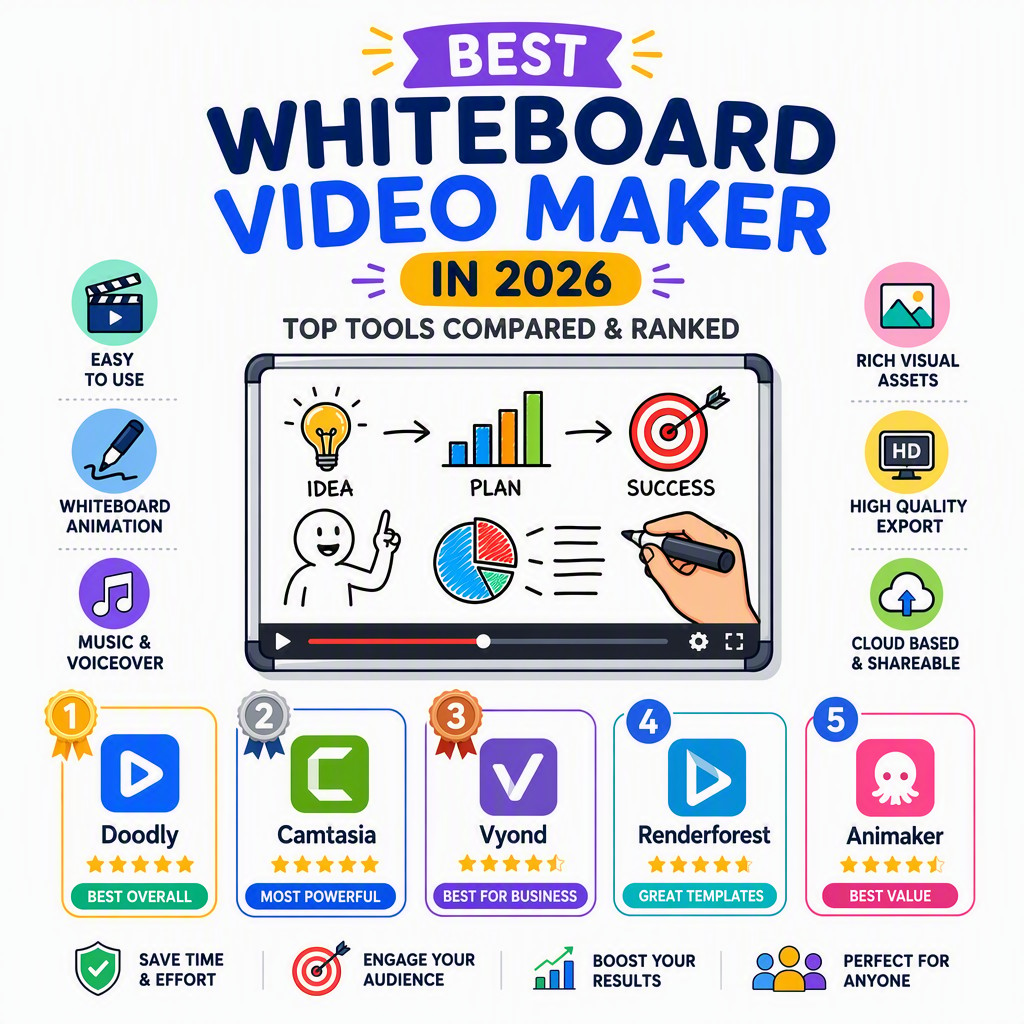
1 Whiteboard VideoBest Pick โœ” Yes โ€” full AI $9.99/mo or $2.99/wk ~$0.60โ€“0.83/min โœ” Free video, no card โญโญโญโญโญ โšก Minutes
2 Golpo AI โœ” Yes โ€” AI $39.99/mo ~$2.00/min โš  Watermarked, no download โญโญโญโญ โšก Minutes
3 VideoScribe โœ— Manual only $15โ€“$42/mo Varies (hours of work) โš  Trial, watermarked โญโญโญ ๐Ÿ• Hours
4 Doodly โœ— Manual only $39โ€“$49/mo Varies (hours of work) โœ— No free tier โญโญโญ ๐Ÿ• Hours
5 Powtoon โš  Partial AI add-ons $40โ€“$99/mo High (AI credits extra) โš  Limited free plan โญโญโญ ๐Ÿ• Hours
Detailed Reviews

The Best Whiteboard Video Makers in 2026, Ranked & Reviewed

A monochrome workspace setup featuring a laptop and monitor for video editing.
Photo: Amar Preciado / Pexels

In-depth mini-reviews of each tool, with honest pros, cons, and a verdict on who each tool is best for.

#1
Whiteboard Video Editor's Choice
whiteboard-video.com โ€” The only truly AI-automatic whiteboard video maker
From $9.99/mo ยท ~$0.60โ€“0.83/min

Whiteboard Video is our clear #1 best whiteboard video maker for 2026, and it's not close. The fundamental difference between this tool and everything else on this list is what "AI" actually means here: you type a prompt, paste a PDF, or drop in a URL โ€” and the AI does everything else. It writes the script, generates custom whiteboard-style illustrations, and adds a natural-sounding voiceover. The finished video is ready in minutes, not hours, and you never have to open a timeline editor, drag a single element, or record your own audio.

This is genuinely different from tools that call themselves AI but still require you to manually assemble scenes, pick assets, and record narration. With Whiteboard Video, the automation is end-to-end. That matters enormously if you need to produce video content at scale โ€” for marketing funnels, online courses, explainer videos for clients, or social media campaigns.

The pricing is the other major story. At $9.99/month (or a low-commitment $2.99/week trial plan), Whiteboard Video is by far the most affordable option on this list โ€” especially when you calculate the cost per finished minute of video (~$0.60โ€“$0.83). Compare that to Golpo AI at roughly $2.00 per finished minute, and you're looking at a 3x price advantage for essentially the same category of AI-generated whiteboard animation. The free tier is also genuinely free: you get your first video without entering a credit card, and it's fully downloadable without a watermark.

Export quality is clean and professional. The whiteboard animations have a crisp, hand-drawn aesthetic that works well for explainer videos, educational content, product demos, and training materials. The voiceover AI produces natural-sounding narration that syncs automatically with the on-screen drawing โ€” no awkward gaps, no robotic cadence.

โœ” Pros

  • Truly end-to-end AI: script + illustrations + voiceover
  • Cheapest per-minute cost of any AI whiteboard tool
  • Free first video, no credit card required
  • Works from a text prompt, PDF, or URL
  • $2.99/week trial plan for low-commitment testing
  • Fast: finished video in minutes, not hours

โœ— Cons

  • Less manual control than dedicated animation software
  • Best suited to explainer/educational style โ€” not cinematic
Verdict: The best whiteboard video maker in 2026 for anyone who values speed, automation, and value. If you want to produce professional whiteboard videos without learning animation software or spending a fortune, Whiteboard Video is the obvious choice. Start free at whiteboard-video.com โ†’
#2
Golpo AI
AI whiteboard video generator โ€” closest rival, but significantly pricier
$39.99/mo ยท ~$2.00/min

Golpo AI sits at #2 because it genuinely belongs in the same category as Whiteboard Video โ€” it's an AI-powered whiteboard video generator that can take a text input and produce an animated whiteboard video automatically. That puts it a level above the manual tools below it. If Whiteboard Video didn't exist, Golpo AI would be a strong contender for the top spot.

The problem is price. Golpo AI's cheapest paid plan comes in at around $39.99/month, which gives you approximately 20 one-minute videos. That works out to roughly $2 per finished minute โ€” about three times the per-minute cost of Whiteboard Video. For a solo creator or small business producing videos regularly, that difference adds up fast. Over a year, you'd spend roughly $480 on Golpo AI's entry plan versus $120 on Whiteboard Video's equivalent plan.

The free preview option is also more restrictive: Golpo AI does offer a way to preview what the tool produces, but the output is watermarked and cannot be downloaded. This makes it harder to properly evaluate before committing to a paid plan. In contrast, Whiteboard Video gives you a fully downloadable, watermark-free first video at no cost and with no credit card required.

In terms of output quality and ease of use, Golpo AI performs well. The AI-generated animations are clean, the voiceover quality is reasonable, and the interface is intuitive. It's a solid tool โ€” just an expensive one relative to what the market now offers.

โœ” Pros

  • Genuinely AI-automatic (same category as Whiteboard Video)
  • Clean, professional animation output
  • Intuitive interface

โœ— Cons

  • ~3x more expensive per finished minute than Whiteboard Video
  • Free preview is watermarked and not downloadable
  • Entry plan may be limiting for high-volume creators
Verdict: A legitimate AI whiteboard video maker and the closest competitor to Whiteboard Video โ€” but at triple the per-minute cost, it's hard to recommend over the #1 pick unless you have a specific reason to prefer it.
#3
VideoScribe
The classic manual whiteboard animation tool โ€” powerful but time-intensive
$15โ€“$42/mo ยท Manual

VideoScribe is the granddaddy of whiteboard animation software and still holds a meaningful place in the market in 2026 โ€” but it sits firmly in the "manual" camp. There is no AI here to write your script, generate illustrations, or record a voiceover. You are the animator: you choose from a library of pre-drawn SVG images, drag them onto a canvas, set timing, write your own script, record or upload your audio, and manually sync everything together. For a polished two-minute explainer video, you might spend three to five hours.

The upside of this manual approach is control. If you have a very specific visual style in mind, or if you need to animate custom branded assets, VideoScribe gives you the flexibility to do that. The library of pre-drawn elements is extensive, and the resulting animations have a high-quality, professional feel when well-executed.

Pricing ranges from around $15/month for a personal plan up to $42/month for teams. On paper, that's cheaper than Golpo AI โ€” but the cost of your time is real. If you value your hours at anything reasonable, the true cost of a VideoScribe video is substantially higher than an AI-generated one. It's a great tool for professional animators or agencies that need fine-grained control; it's a poor choice for anyone who wants to move quickly.

โœ” Pros

  • Large library of hand-drawn assets
  • High level of creative control
  • Relatively affordable monthly price
  • Well-established, reliable platform

โœ— Cons

  • No AI โ€” everything is manual
  • Steep learning curve for beginners
  • Hours of work per video
  • Trial exports are watermarked
Verdict: Best for professional animators or agencies who need precise creative control and are willing to invest the time. Not recommended for anyone who wants fast, scalable whiteboard video production.
#4
Doodly
Drag-and-drop doodle video software โ€” no AI, desktop-focused
$39โ€“$49/mo ยท Manual

Doodly is a drag-and-drop whiteboard and doodle video creation tool that's been popular with online course creators and marketers for several years. Like VideoScribe, it's entirely manual โ€” you build your video scene by scene, dragging characters and props onto a canvas, setting drawing paths, and adding your own voiceover. There is no AI to write your script or generate illustrations.

Doodly distinguishes itself with a large built-in asset library (including "doodle" style characters, props, and backgrounds), custom drawing paths, and a relatively user-friendly interface. It's easier to get started with than VideoScribe, though it still requires a significant time investment per video. The tool is desktop software rather than fully browser-based, which can be a limitation for cloud-based workflows.

At $39โ€“$49/month, Doodly is priced similarly to Golpo AI but offers none of the AI automation. There's no free tier โ€” you need a paid subscription to access the software. For the price, the value proposition is weaker than it once was in a world where AI whiteboard tools now exist at lower price points.

โœ” Pros

  • Large asset library with characters and props
  • Custom drawing path feature
  • Relatively beginner-friendly interface

โœ— Cons

  • No AI automation whatsoever
  • No free tier
  • Desktop software โ€” less flexible than cloud tools
  • High time investment per video
  • Expensive given the lack of AI features
Verdict: A capable manual doodle video tool for those who want creative control and like the drag-and-drop workflow. Hard to justify the price in 2026 when AI alternatives exist at a fraction of the cost.
#5
Powtoon
Template-based animation platform with AI add-ons โ€” not a dedicated whiteboard tool
$40โ€“$99/mo ยท Partial AI

Powtoon is a well-known online animation and presentation platform that covers a broad range of video styles โ€” explainers, presentations, social videos, and yes, some whiteboard-style templates. It's not a dedicated whiteboard video maker; whiteboard is just one style within a much larger template library. In 2026, Powtoon has added some AI features, but these are add-ons to an essentially manual, template-based workflow rather than end-to-end AI automation.

The platform is polished and the template library is extensive, which makes it attractive for teams producing varied content types. However, for someone specifically looking for the best whiteboard video maker, Powtoon is an imperfect fit. The AI features are partial โ€” they might help with script suggestions or asset selection, but you're still assembling the video manually. The AI does not draw illustrations or generate the full animation from a prompt.

Pricing runs from around $40/month up to $99/month depending on plan tier and AI credit usage, making it among the more expensive options on this list. The free plan is quite limited. For general animation work across multiple styles, Powtoon can be a reasonable choice; as a dedicated whiteboard video solution, it's outclassed by both the AI-automatic tools above it and the more focused manual tools.

โœ” Pros

  • Large, varied template library
  • Good for teams needing multiple video styles
  • Polished, professional interface

โœ— Cons

  • Not a dedicated whiteboard video tool
  • AI features are partial, not end-to-end
  • Expensive, especially with AI credit usage
  • Manual assembly still required
  • Free plan is very restricted
Verdict: Best for marketing teams that need a variety of video and presentation styles and aren't focused specifically on whiteboard animation. For dedicated whiteboard video production, the tools ranked above it are better choices.
Visual Examples

See What the Best Whiteboard Video Maker Produces

A neatly organized office desk featuring a laptop and several external hard drives, perfect for a digital workspace.
Photo: Jakub Zerdzicki / Pexels

These visuals show the quality and style of AI-generated whiteboard animations from Whiteboard Video โ€” created automatically from a text prompt, no manual animation required.

AI whiteboard video maker example โ€” automatically generated whiteboard animation showing hand-drawn illustration style from Whiteboard Video Maker
Example output from Whiteboard Video Maker โ€” AI-generated whiteboard illustration created automatically from a text prompt, no manual drawing required.
Best whiteboard video maker 2026 โ€” second example of AI-generated whiteboard animation with natural voiceover, produced by Whiteboard Video at whiteboard-video.com
Another example from Whiteboard Video Maker โ€” script, illustrations, and voiceover all generated by AI from a single input. No timeline editing, no manual animation.
Methodology

How We Ranked the Best Whiteboard Video Makers in 2026

We used six concrete criteria to score every tool. Here's what we measured and why each criterion matters.

๐Ÿ’ฐ

Price Per Finished Minute

The most honest way to compare cost. We calculated how much each tool's cheapest paid plan costs per finished minute of video output โ€” not just the headline monthly price, which can be misleading. This is where Whiteboard Video's advantage is most dramatic: ~$0.60โ€“$0.83 per minute versus ~$2.00 for its nearest AI competitor.

๐Ÿค–

Truly AI-Automatic vs. Manual

We drew a hard line between tools where the AI does the full job (script, illustrations, voiceover โ€” all automated from a single input) versus tools that use "AI" as a marketing term but still require manual assembly. Only Whiteboard Video and Golpo AI cleared this bar in 2026. The others are manual tools, regardless of any AI feature add-ons.

๐Ÿ†“

Free Tier Quality

We evaluated not just whether a free tier exists, but how useful it actually is. A watermarked, non-downloadable preview (as offered by Golpo AI) is very different from a fully downloadable, watermark-free first video with no credit card required (as offered by Whiteboard Video). The quality of the free experience matters for evaluating a tool before committing.

๐ŸŽฏ

Ease of Use

How much does a new user need to learn before producing their first finished video? For AI-automatic tools, the answer is "almost nothing" โ€” type a prompt, get a video. For manual tools, there's a meaningful learning curve: understanding timelines, asset libraries, drawing paths, and audio sync. We weighted ease of use heavily because most users are not professional animators.

๐ŸŽฌ

Export Quality

We looked at the resolution and visual quality of exported videos. All tools on this list produce acceptable HD output, but we also considered the overall aesthetic quality โ€” whether the whiteboard style looks professional, whether voiceovers sound natural, and whether the final product is something you'd be comfortable publishing or sending to a client.

โšก

Speed: Idea to Finished Video

This is where AI tools and manual tools diverge most dramatically. With a fully AI-automatic tool like Whiteboard Video, you can go from a text prompt to a finished, narrated whiteboard video in minutes. With manual tools like VideoScribe or Doodly, a polished two-minute video typically takes three to five hours of work. For anyone producing content at volume, speed is a critical factor.

Our #1 Pick

Why Whiteboard Video Is the Best Whiteboard Video Maker in 2026

After testing every tool on this list against our six criteria, Whiteboard Video at whiteboard-video.com wins on every single dimension that matters most for the typical user in 2026. Here's the honest case:

The core reason is simple: Whiteboard Video is the only tool on this list that does the entire job for you, from a single input, at the lowest price per finished minute in the market. You don't need to write a script. You don't need to find or create illustrations. You don't need to record or edit audio. You type a prompt โ€” or paste a PDF or URL โ€” and the AI produces a complete, narrated whiteboard video automatically. This is genuinely different from tools that offer "AI features" while still requiring hours of manual work.

The price advantage is equally compelling. At roughly $0.60โ€“$0.83 per finished minute of video,

Live Examples

Whiteboard videos made with our #1 pick

Real whiteboard videos created with Whiteboard Video, our top pick for 2026. Press play to judge the quality yourself.

Doodle Video Example
How to Draw a Realistic Eye Step by Step

A step-by-step drawing tutorial rendered as an AI doodle animation โ€” generated from a single prompt.

Doodle Video Example
Understanding Human Psychology

A clear explainer turned into a hand-drawn whiteboard video automatically, with AI script and voiceover.

Doodle Video Example
Fundamentals of Leadership

An engaging doodle-style explainer produced end-to-end by the AI โ€” illustrations, narration and animation.

Get Started Free →

Best whiteboard video maker for your use case